|
If you do have a question which isn't answered here please do not hesitate to contact us.
What do I need?
Just your photos - between 30 and 40. Some space to spread pictures out also helps.
How many pictures do I need?
We would recommend that you aim for six to eight pictures a minute - this creates a five minute Slideshow with time for reflection as pictures are viewed. More can be used, but any more than 10 per minute means that a show is likely to be too fast.
I’m not sure that I can cope with going through pictures at this time.
Many of our families say that, but then find that the process gives them something positive to focus on and a purposeful way to cope with grief by remembering good times from their loved one’s life.
What media can I use?
- Photographs – up to A4 – we can arrange for larger pictures and items to be photographed.
- Digital files – all common formats – jpg, tif, bmp, raw etc.
- Scans – we will scan your pictures, but if you wish to do this please scan pictures at the highest resolution your scanner (and computer) will support - at least 300 DPI. We will be zooming in to the key subjects and need the best resolution we can get.
- Video – no more than 30 second clips from tape or in a digital format. Video can be useful but doesn't always add to a show.
How do I mark the pictures?
Please don’t mark your pictures. Use Post It notes with a number or put each picture in an envelope with information written on the front. Make sure that you have labelled each picture with a clear number. If there are no labels, we will choose a suitable order. An easier way to organise the pictures is to spread them out in order and photograph them in situ using a smart phone. These will give all of the information needed for us to produce the show.
I’d love to use a picture, but it’s damaged.
We can restore and remove minor scratches, stains, tears, discolouration – some pictures may be beyond restoration but we will try.
What about music?
Music tracks are a key part of a Slideshow and help to provoke reflection - You'll need one piece of music, about 5 minutes long. Shorter or longer tracks can normally be edited to the correct length.
During a service the music is normally played during the slideshow. This can either be direct from the DVD (using a PA system) or by asking the venue to play a particular piece of music at a particular time. We can arrange this.
Copyright is a legal requirement. You must own the original copies of the music you wish us to use. You can supply this with your other media. We regret that we cannot use copies
How will the slideshow be shown?
We can hire you a complete projection solution including set up and operation during the service. When hired as part of a tribute package, the cost is reduced.
Increasingly crematoria have slideshow facilities and we can produce shows that will work on these systems.
This hire service can also be used separately for your own presentation to show videos, photographs and slides - It doesn’t have to be used only for our slideshows. Just contact us for details.
During the service, what happens while the slideshow is not playing?
A static key picture is displayed throughout the service. The slideshow is then started at your chosen point.
I have a picture but I would like to change or remove part of it?
We can carefully remove, replace or even change parts of the photo to make a "perfect picture" - remove a object, highlight a part of it or even add person.
How long will it last?
Show timings vary and is really up to you. Past experience shows that for a Funeral Service a slideshow of 4-5 minutes works well, showing 6 or 8 pictures a minute. This allows a comfortable time for reflection as the slideshow is viewed.
it is important that your celebrant knows about the show. They are welcome to talk to us if they have any worries about the slideshow impacting on the service time - it won't.
What about at a reception?
The slideshow can be looped during receptions to ensure that everyone has a chance to view and reflect on the pictures.
I get a DVD to keep?
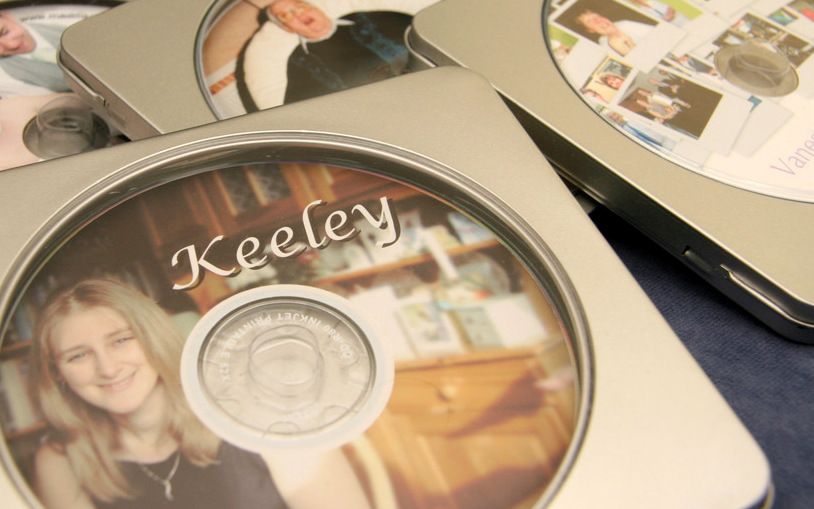
Yes - a beautifully printed DVD presented in a metal DVD case with a clear front. An example is shown to the left.
I don't have a DVD player?
Some people still don't - but we can either supply the Slideshow on VHS Videotape or loan/supply a recommended DVD player.
Can I have a version for the web?
Of course. It's how our examples are shown. In addition we can supply shows for watching on iPad, iPhone and Anderoids.
How much does it cost?
Every slideshow we create is priced differently due to the different factors that each one involves; Shown at reception or service, length, additional copies of the slideshow. Just contact us for a quote.
|
I love the idea - but you are outside my area?
Some of our shows are created without ever meeting the family. Using on-line technology, we can collect the pictures. Completed DVDs are returned by Special Delivery. If time is too tight, everything can be done electronically and the physical disc made at your end. We never recommend using a laptop. Blue screening and Windows upgrades never look good at a service!
I can do it all myself!
Absolutely. But ... it is very harrowing doing a good job when you know the person who has passed away and you have a thousand other things to do ready for the funeral.
There are lots of wizards that will help you make shows - in general they are very restrictive, repetitive and gimmick laden.
They also need to fit in with the structure of the service.
Most importantly - the service has been designed for EVERY person there to have the opportunity to reflect and pay their respects. Being distracted by having to set up equipment in a very tight time scale and following very strict H & S requirements, isn't perhaps the best way to do that.
|
I still really need some help!
Just contact us and we will either talk you through any questions or even visit you and help organise your show.
|
